
How to Use Qibla Compass on Apple Watch
Open Qibla Compass on Apple Watch, allow the location to update, hold your wrist level, and turn slowly until the direction marker settles. Check for magnetic bands or nearby metal if the reading moves unexpectedly.
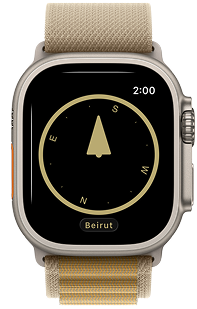
Get a current bearing on the watch
The app needs your current location because the direction toward Makkah changes from city to city. Open Qibla Compass after arriving at the place where you plan to pray, wait for the reading to appear, and avoid using a direction remembered from a previous trip.
Hold your forearm so the watch face is close to level. Turn your body slowly instead of twisting only the wrist. This gives the marker time to respond and makes it easier to relate the direction to the room.
Watch bands and compass interference
Some watch bands and clasps contain magnets. Speakers, laptops, steel tables, cars, and exercise equipment can also affect the compass. If the marker spins or produces a surprising result, move away from those objects and test again.
For a useful comparison, check the direction in an open spot with both the watch and iPhone. Do not hold the devices directly beside one another. If both return to the same room line after a slow turn, the result is more likely to be stable.
Qibla Compass version 3.2.1 includes a dedicated Apple Watch experience for checking the direction from your wrist.
Get Qibla CompassTurn the watch reading into a prayer line
After alignment, pick a fixed object in front of you. A wall edge, window, floor seam, or rug corner can become the reference for the prayer mat. You can lower your wrist once that line is clear.
In a familiar room, you only need to establish the line once unless furniture changes or the original reading was taken near metal. In a new building or city, update the location and repeat the check.
If the Watch reading does not settle
- Confirm Location Services is available on the paired devices.
- Move away from metal and remove a magnetic band for the test.
- Keep the watch level and rotate slowly.
- Compare the room line with the iPhone app from the same clear area.
Apple’s own compass guidance notes that magnetic materials can affect performance. Treat a changing marker as a reason to improve the testing environment, not as a final prayer direction.
Apple Watch Qibla questions
Can a magnetic Apple Watch band affect Qibla direction?
Magnetic materials in some bands can affect a compass. If the reading is unstable, remove the band or compare the result away from magnetic accessories.
Why does Qibla Compass need my location on Apple Watch?
Your location is needed to calculate the bearing from where you are to the Kaaba. The watch compass then shows how to face that bearing.